Highway Weather
Weather Route, Inc.Weather
3.4895.00 Reviews
- Version
- 6.128
- Installs
- 500.00K
- Age Rating
- Everyone
Screenshots
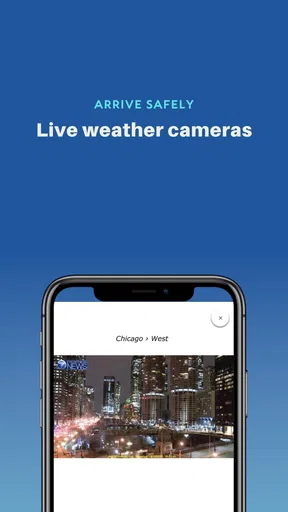
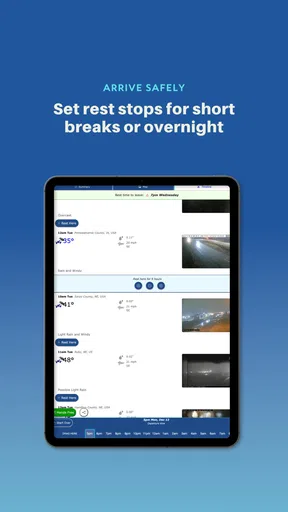
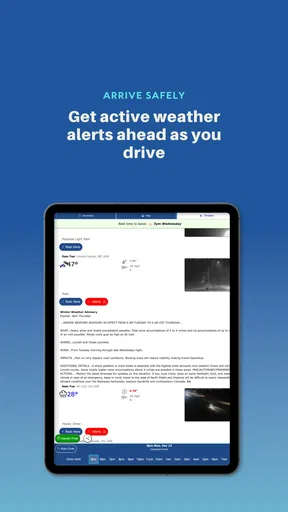
Our Review of Highway Weather
 Analysis by Appyee
I’ve found Highway Weather most useful before a drive, when I can compare the forecast along a route with the time I expect to reach each area. That travel-first approach solves a different problem from checking whether it will rain where I am right now. It also makes connectivity part of the experience: route planning and current forecasts are most useful when the app can reach the information it needs, so I treat it as a planning companion rather than something to depend on blindly once I’m already driving.
When the route forecast helps most
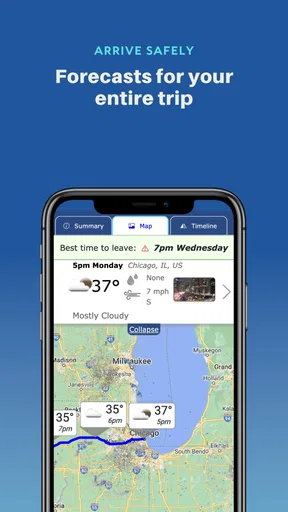
For a long drive, the weather at the destination is only part of the picture. Highway Weather is designed around the places you’ll pass through and the time you’re expected to arrive there. That can help you think ahead about a changing forecast instead of leaving home with a single city’s conditions in mind. I’d use it before a weekend trip, a visit to family several hours away, or a work journey that crosses areas with noticeably different weather.
A practical way to use that information is to check the route before packing or setting off, then revisit the plan if your departure time changes. A delay can shift when you reach a stretch of road, which may also change the conditions you encounter there. The forecast is a planning aid, not a promise: weather can change, and a route estimate cannot replace paying attention to road conditions and official safety guidance.
Network matters before and during a trip
Because the app is built around route and weather information, a working connection is important when you’re setting up a journey or refreshing what you’ll encounter. I would plan the route while I have reliable service, rather than waiting until I’m in a remote area or already on the move. If reception becomes unreliable, I would avoid assuming that a forecast or route view has refreshed; check it again when you regain a connection.
This is also a reason to do the detailed planning while parked. A passenger can review changes during a trip, but the driver should not be tapping through forecasts behind the wheel. If the weather picture changes, stopping safely before making decisions is a much better use of the app than trying to respond while driving.
A focused companion, not a replacement for every weather tool
Highway Weather is a weather app from Weather Route, Inc. Its particular value is organizing conditions around a journey, rather than simply centering the forecast on your current location. A conventional local weather app may be quicker when all you want is today’s temperature or a short-term outlook for home. A navigation app, meanwhile, is the tool I’d keep open for turn-by-turn directions and traffic decisions. These tools answer different questions, and I see this one as an extra planning layer rather than a reason to discard either alternative.
That distinction matters on a short, familiar commute: opening a dedicated route-weather app may add little if the weather is steady and you already know the roads. It makes more sense when the trip is long enough for conditions to vary, or when the timing of rain, snow, or other difficult weather could affect when you leave. I’d also compare the forecast with trusted local weather and road-safety information before changing plans for a serious weather risk.
Who will get the most from it
I’d recommend it to people who regularly drive between cities, plan road trips in advance, or want to consider weather timing before choosing when to depart. It can also be useful for someone coordinating a pickup or arrival, since the weather where the journey ends may not match what is happening at home. If you mostly walk, take public transit, or need a detailed local forecast for one neighborhood, a general-purpose weather app is likely the more direct choice.
The app is free to download, has an Everyone age rating, and has been available since January 24, 2013. Its current version is 6.127, and the minimum operating-system requirement is 7.0. It has a 3.5 average from around 2.2 thousand ratings, with over 100 thousand installs. Those figures suggest an established but fairly specialized app; I would treat the rating as a reason to try it for my own route rather than assume every forecast or workflow will suit me. Optional in-app purchases range from $3.99 to $17.99 per item, so I’d check what is included before paying and start with the free experience.
One useful habit is to separate forecast checking from navigation. I’d review the weather plan before leaving, note the stretches or arrival window that deserve attention, and then use my preferred navigation tool for the drive itself. That reduces app switching on the road and makes it easier to judge whether a change in departure time is worth considering. For a passenger, checking again at a safe stop can help reassess the plan without asking the driver to manage another screen.
What to do when information feels out of date
If a forecast appears stale or a route no longer matches the journey, I’d first check whether the phone has a usable connection and whether the trip details still reflect the actual start time and destination. Then I’d refresh or review the plan while stationary. If service is poor, I would not count on the app to provide a newly updated picture until connectivity returns. Keeping a separate navigation option available is sensible, particularly where route guidance and live driving decisions matter more than comparing weather along the way.
I would also avoid treating a suggested departure time or alternate route as an instruction. Such guidance can help frame a choice, but a longer route may have its own practical costs, and the weather can evolve after a forecast is made. For severe conditions, postponing a trip or following local road advisories may be wiser than trying to optimize the route around a forecast alone. This is where the app’s focus is useful but also limited: it helps bring weather into trip planning, while the traveler still has to judge safety and changing circumstances.
Planning around weather, not replacing judgment
Ever been caught in a sudden downpour or snowstorm during a road trip? Well, I’ve been there too, and let me tell you, it’s not fun. That’s where Highway Weather comes in. This app promises to keep you one step ahead of Mother Nature, letting you plan your trips with weather conditions in mind. I decided to give it a spin and see if it really delivers on its promise.
Setting Up and First Impressions
Getting started with Highway Weather is a breeze. It’s available on both Android and iOS, so no matter your device preference, you’re covered. Once downloaded, the app greets you with a simple and intuitive interface. I was immediately impressed by how easy it was to navigate through the options. The design is clean, and everything is laid out logically.
After a quick setup, where you allow location access (a must for accurate forecasts), you’re ready to hit the road—or at least, plan to. The app asks for your starting point and destination, then calculates the weather conditions along your route. It even considers the time you’ll be traveling, which is super handy for long trips.
Features That Stand Out
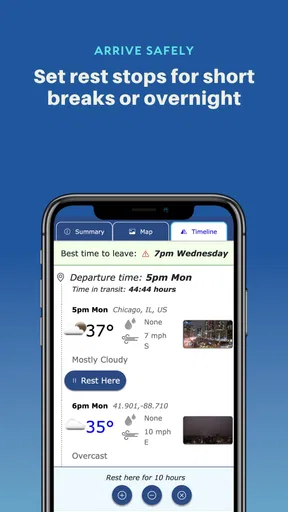
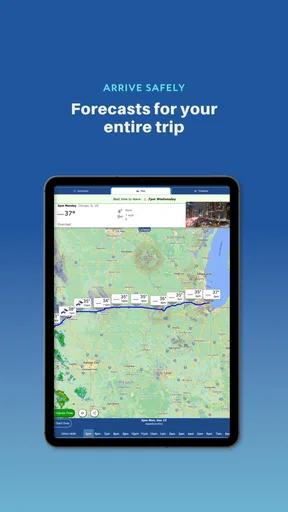
One of the standout features of Highway Weather is its ability to provide a detailed forecast for your entire route. This isn’t just a general overview; you get hour-by-hour forecasts, which is incredibly useful. I tested it by planning a trip from sunny San Diego to snowy Denver. The app showed me exactly when I’d hit rain, snow, and even clear skies along the way.
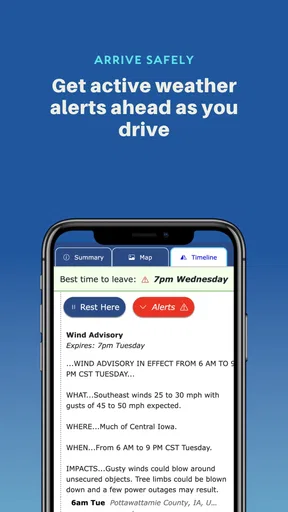
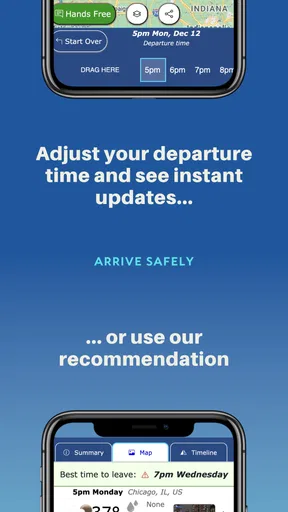
Another feature I found useful is the app’s ability to suggest the best time to start your journey based on the weather. It’s like having a personal meteorologist in your pocket. Not to mention, it alerts you to severe weather conditions, which is perfect for safety-conscious travelers like me.
The app also offers a handy feature for customizing your travel preferences. You can choose to avoid certain weather conditions, and it will suggest alternative routes. This flexibility is great for those who might prefer a longer but safer route.
Performance and Reliability
In terms of performance, Highway Weather is solid. During my testing, the app ran smoothly without any crashes or lag. The forecasts were accurate, at least for the test trip I planned. I appreciated the real-time updates, which kept me informed of any changes in the weather.
The app also integrates with other navigation tools like Google Maps, which is a huge plus. You can easily switch between apps without losing your route information. This integration makes Highway Weather a valuable companion for any road trip.
Is It Worth the Download?
If you’re a frequent traveler or someone who likes to be prepared for any weather conditions, Highway Weather is definitely worth a look. The app’s user-friendly interface, detailed forecasts, and customizable features make it a strong contender in the weather app market.
While there are other weather apps out there, the focus on travel and route-specific forecasts sets Highway Weather apart. It’s a niche app, but it fills that niche very well. I found it especially useful for planning longer trips where weather conditions can vary drastically.
In conclusion, Highway Weather is a must-have for any road warrior or casual traveler who wants to stay ahead of the weather. It’s not just about knowing if it’s going to rain; it’s about knowing when and where, and that makes all the difference when you’re out on the open road.
Verdict
Strengths of Highway Weather
- Accurate weather forecasts along routes.
- User-friendly interface for easy navigation.
- Customizable alerts for severe weather.
- Integrates with major GPS apps seamlessly.
- Real-time updates keep info current.
Limitations of Highway Weather
- Requires constant internet connection.
- Limited offline functionality.
- Occasional ads can be distracting.
- Some features locked behind paywall.
- Battery drain on longer trips.
Similar Picks in This Category
View All
Weather - By Xiaomi
Xiaomi Inc.4.1

Weather & Radar Forecast
WetterOnline4.8

Weather
OneLouder Apps4.6

AccuWeather: Weather Radar
AccuWeather3.6

The Weather Channel - Radar
The Weather Channel4.6

1Weather Forecasts & Radar
OneLouder Apps4.3
Frequently Asked Questions
What is Highway Weather and how does it work?
Highway Weather is a user-friendly app designed to provide real-time weather updates for your driving routes. It uses your GPS location to track your journey and offers detailed forecasts, including temperature, precipitation, and wind conditions, ensuring you stay informed and safe on the road.
Can I use Highway Weather offline?
Highway Weather primarily requires an internet connection to fetch real-time weather data and updates. However, some features, like previously downloaded route information, may be available offline. For the best experience and accurate forecasts, it's recommended to use the app with an active internet connection.
Does Highway Weather support alerts for severe weather conditions?
Yes, Highway Weather provides alerts for severe weather conditions. The app notifies you of potential hazards such as storms, heavy rain, or snow along your route, allowing you to plan accordingly and ensure safer travels. Customize alert settings to receive notifications based on your preferences.
Is Highway Weather available for both Android and iOS devices?
Highway Weather is available for both Android and iOS platforms. You can download it from Google Play Store or Apple App Store, ensuring compatibility with a wide range of devices. This cross-platform availability makes it a convenient choice for most smartphone users.
Does Highway Weather offer any premium features?
Highway Weather offers both free and premium versions. The free version includes basic weather forecasting features, while the premium subscription provides enhanced functionalities like extended forecasts, ad-free experience, and advanced alert settings. Consider the premium option if you frequently travel and need more detailed weather insights.
